PDS in High Availability (HA) mode
In general, it is a good to spread the risk of PSD service outages (usually caused by the unavailability of the server where the PDS is installed in) to several other servers. We generally recommend at least two instances of PDS on two different servers. These servers can be joined in one domain or in several separated domains (To learn more, see Multi-forest configuration chapter). PDS in multi-instance mode demonstrates the following figure.
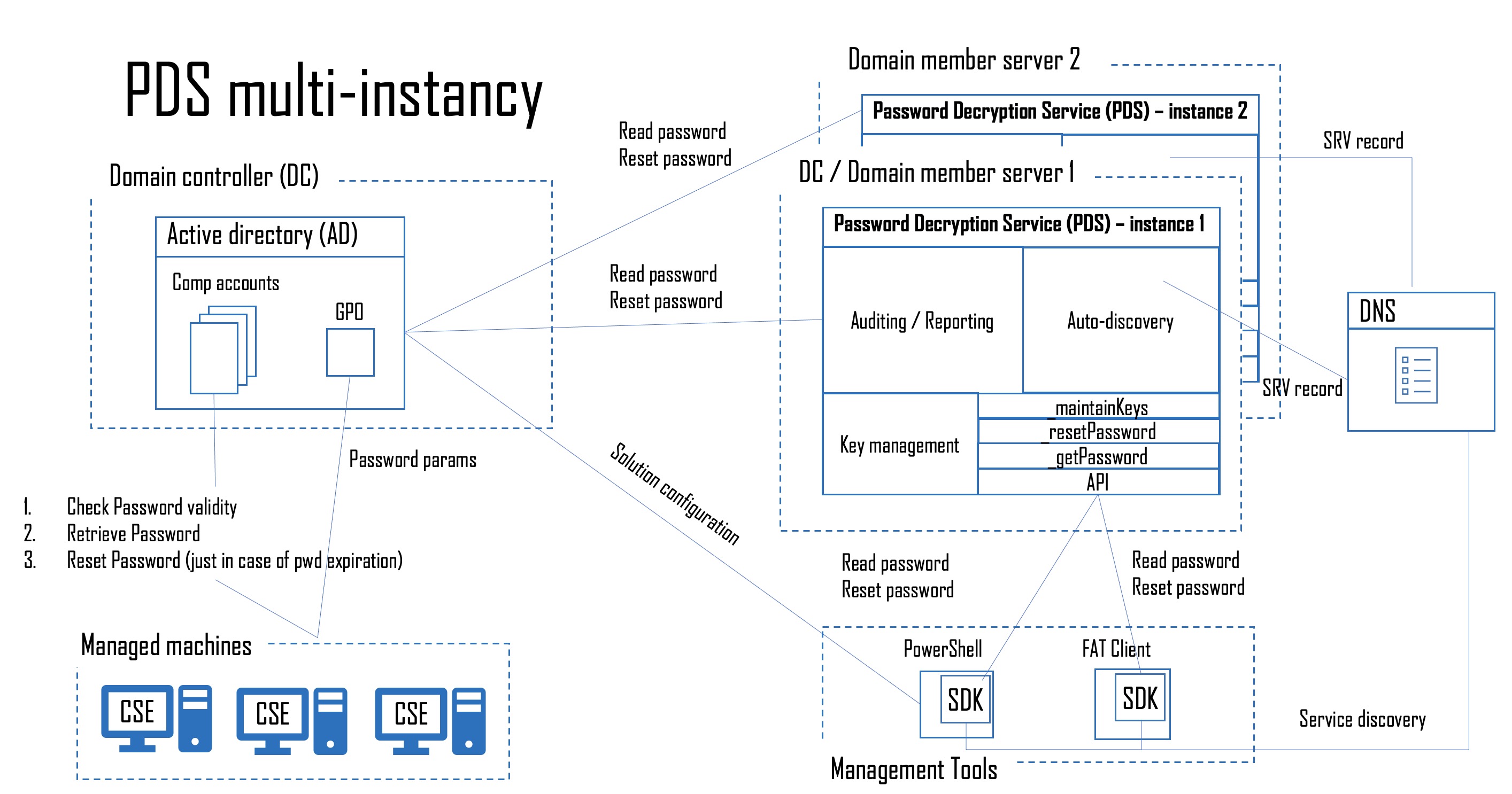
Who desides which instance of PDS can communicate with Active Directory?
As you can see on the picture there is Autodiscovery module located in each instance of PDS and also in SDK wrapper. Each time the PDS need to communicate to the AD via the PS module or via a fat client, the SDK Autodicovery module automaticaly selects a suitable DNS record and immediately tries to establish a connection with the selected PDS instance. In case that choosen instance of PDS is unavailable (outage, issue,…), then SDK chooses another PDS SRV record from DNS and try to open communication with next instance of PDS. In case that SDK find available PDS than call PDS API to serve user request (read/reset password, see pwd history,…).
How to configure PDS to multi-instance
Install first instance of PDS on dedicated server (use AdmPwd.E.Tools.Setup.<platform>.msi).
Generate new encryption/decription key pair for this instances of PDS. To generate new key pair follow steps mentioned in Installation article, chapter Configuration Of GPO. Or check our video tutorial.
Install rest of PDS instances to dedicated servers and copy your new key (#_Key.dat) located on PDS server in path: %ProgramFiles%\AdmPwd\PDS\CryptoKeyStorage to each server with installed PDS instace to path: %ProgramFiles%\AdmPwd\PDS\CryptoKeyStorage and restart each AdmPwd.E.PDS service in Win32 services.
Note: do not rename key file!